Showing posts with label opensim. Show all posts
Showing posts with label opensim. Show all posts
Monday, May 22, 2017
Opensim in the Classroom: How To Get Started


Sunday, April 23, 2017
Workflows for Virtual Worlds/Virtual Reality
These are some notes I'm taking to remember how I got some things to work for student projects.
Scenario 1: Importing 3D Models Into Opensim
Correcting Collada Model Errors
First time I spent money ($15!) on a 3D model to use there was an issue. The snow leopard was inside-out; the texture was on the inside and the outside was transparent. I learned after much searching that the "normals" had to be recalculated, which can only be done in a 3D program. The download included an FXB file so I used Blender, imported the FXB file, went to Edit Mode > Mesh > Normals > re-calculate outside normals which flipped the orientation of the faces to outside. Then I exported that as an OBJ file. Then I could import into Opensim with Singularity viewer. I chose File > Upload Mesh > High detail. It comes in gray so change the color to
Saturday, January 07, 2017
OpenSimulator In the Classroom Through the Years
I haven't run any sim projects for a while and I miss it. I just found a cache of pictures of sim projects and am amazed at how far it's come. Here are some of the pictures to give an idea of the territory students and I covered together. What an adventure!
 |
| Our first sim, 2009! With a spare assortment of prims students acted out skits for their drama class. |
Thursday, November 28, 2013
Student Machinima in OpenSim With Greenscreen

I think Rand Spiro's Cognitive Flexibility Theory describes the use of technology to solve creative problems well. Of course there are optimal setups for creating machinima but here I had to help a student realize a very complex project with minimal training and portable equipment, as she had to complete it over the Thanksgiving weekend.
So here's what I came up with. I will find out on Monday how successful it will have been:
- We have a school OpenSim virtual world, but currently port forwarding is not set up in the firewall, so it's not an option for working at home. She has a Mac so she couldn't use SoaS. So we set up her own sim, installing MySQL, Mono, and Diva distro. After a few hiccups she was up and running.
- We needed the Diva account functionality to set up the character and camera person accounts and I had chosen Imprudence for a viewer and for some reason the Diva splash page wasn't showing up. I found Singularity which turns out to be quite awesome.
- Next was loaning her a PC she could use for the filming. I put Fraps and Singularity on it and taught her how to change her MyWorld.ini and RegionConfig.ini files to reflect her LAN IP so the PC could log into her sim. I taught her how to use Fraps, which is dead simple.
- For multiple avatars in the same scene, all directed by her, she would need a green floor and background, which she would then have to edit together in a video editor. She made some nice avatar costumes and developed gestures from the stock opensim animations.
- She would have preferred to edit the footage in iMovie on her Mac, as would I, but having the files on the PC in AVI format complicated things, as they would have to be converted to MOV for iMovie. It was too much for me to explain and add to the workflow. So I opted for having her use Movie Maker on the PC. That decision could prove to be the project's undoing as greenscreen is very hard to work with in WMM. We'll see. You have to use WMM 6.0 and install RehanFX shaders, and syncing the overlaid clips is almost impossible. It seems pretty much just set up to make cheesy music videos with ridiculous backgrounds. But it would have to work.
- UPDATE: I am happy to say she managed to get the DVI files copied to her Mac, and used either Perian or Evom to convert them. iMovie makes clip editing much easier, even after applying the greenscreen.
- So the greenscreen workflow consists of syncing two avatar clips, applying the greenscreen so they both appear over green. Export that, and reimport it. Add a third avatar clip and sync those. Apply the greenscreen filter again and export that. Repeat for the fourth avatar clip. Finally, reimport that and greenscreen it with the chosen background image, and if possible figure out how to work in multiple background images for scene changes, which I'm not even sure is possible.
I hope all this works, we'll see.
UPDATE: She completed the video and it came out amazingly well! Here it is. She did end up figuring our how to convert the files from DVI to MOV and move them to iMovie. That should teach me to assume something will be too hard for someone.
UPDATE: She completed the video and it came out amazingly well! Here it is. She did end up figuring our how to convert the files from DVI to MOV and move them to iMovie. That should teach me to assume something will be too hard for someone.
Wednesday, November 30, 2011
Great Student Opensim Build: St. Peter's Basilica
 |
| St. Peter's Basilica, Maderno's Facade |
Saturday, July 23, 2011
Multi-user Sim-on-a-stick
CAUTION: This is a pretty old post, SoaS may have changed, probably has. Just keep in mind...
I love how accessible Sim-on-a-stick makes OpenSimulator. Just plug it in and double click one batch file and after a succession of pretty windows a virtual world awaits. It's like a virtual Rube Goldberg machine unfolding right before your eyes. By default the Sim-on-a-stick flavor of Opensim is for a single user. So teachers with access to a bunch of PCs (yes, it only runs on PCs so far, but I'm sure some dedicated people will figure it out for Mac) could make as many copies on USB drives as they have students, hand them out, and let students manage their own personal sims. Or students could pair up or whatever.
I mentioned in a previous post that an adventurous teacher could configure a Sim-on-a-stick for multiple users, so you'd have all of your students logging into the same sim from their own computers. This would be nice for collaborating on a project, like when I had students build The Parthenon together. In keeping with the Sim-on-a-stick's ease-of-use, here's a step-by-step to doing that. So here goes.
You can go ahead and plug in your USB stick, download the latest version of Sim-on-a-stick from the website and unzip it to the stick. Before you run the Opensim_autostart you have to change a few things.


I love how accessible Sim-on-a-stick makes OpenSimulator. Just plug it in and double click one batch file and after a succession of pretty windows a virtual world awaits. It's like a virtual Rube Goldberg machine unfolding right before your eyes. By default the Sim-on-a-stick flavor of Opensim is for a single user. So teachers with access to a bunch of PCs (yes, it only runs on PCs so far, but I'm sure some dedicated people will figure it out for Mac) could make as many copies on USB drives as they have students, hand them out, and let students manage their own personal sims. Or students could pair up or whatever.
I mentioned in a previous post that an adventurous teacher could configure a Sim-on-a-stick for multiple users, so you'd have all of your students logging into the same sim from their own computers. This would be nice for collaborating on a project, like when I had students build The Parthenon together. In keeping with the Sim-on-a-stick's ease-of-use, here's a step-by-step to doing that. So here goes.
You can go ahead and plug in your USB stick, download the latest version of Sim-on-a-stick from the website and unzip it to the stick. Before you run the Opensim_autostart you have to change a few things.

First, open the folder 'config-include' on the stick at the path in the image.
Find the file 'MyWorld.ini'.

Right click on it and open it with Notepad.
Before you can make the necessary changes to it, you need to know your computer's IP address. So click Start and in the search bar (or Run window if on XP) type 'cmd' and hit enter.

At the C: prompt, type 'ipconfig' and hit enter.
Many lines will fly by, but just scroll back up until you find the section for your IP address. Now, if you are connecting to your network wirelessly, look for the IPv4 Address under the Wireless section. But this setup will cause considerable lag for your students in the sim. Better to connect with an ethernet cable, in which case you will find your IP address in that section. Write down that number. You can type exit and hit enter to close the command line. NOTE: Your IP address does not stay the same, but is likely to change whenever you restart this computer. So to keep this setup you can just not turn off this computer, otherwise do a quick check on the command line to see that it hasn't changed. If it has, you'll need to modify the IP address settings you make in the following steps and to the students' viewers when they log in.
Go back to MyWorld.ini and find the line under [GridService] with the IP 127.0.0.1 and change that to the IP you found with ipconfig. Save and close that file. UPDATE: In practice I've found it best to change ALL occurrences of the IP in MyWorld.ini, just do a search and replace.

Now go up one folder and find the Regions folder and open that.
Find the RegionConfig.ini file, right click on it and open it in Notepad.

In this file, find all 4 occurrences of the ExternalHostName IP address of 127.0.0.1 and change them to your IP. Save and close this.
NOW you can double click the Opensim_autostart file. Sit back and watch the pretty text and windows fly by. The last thing to open will be the Imprudence viewer. When that opens you'll see orange planets on a black background.
At this point you have the option of creating your students' accounts for them or letting them create accounts when they log in. If you choose the former, click "CREATE ACCOUNT" and fill in the relevant information for each of your students.

To log in to your sim, use the Simona Stick (pswd: 123) account and log in using the fields at the bottom. So now you are logged in and your students have accounts (or will make them).
Now for your students! They will need the Imprudence viewer on their computers for them to log in to your sim, so you will have to get that installed.

Once they open it they will see a different default screen. They should click the Grid Manager button, click Add new grid, for Grid Name type whatever name you want for your sim, and MOST IMPORTANTLY, for Login URI they need to type http://your.IP.add.ress:9000/wifi (NOTE: in a recent version this has been changed to http://your.IP.add.ress:9100/wifi), and the same under Login page. This will direct their viewer to your computer where your sim will be running.

They can click OK and select that sim in the grid dropdown. Once they select it they should also be seeing the orange planets.
From here they either create their accounts or simply log in! Then the fun can begin!
Ahh, a couple more things. Your entire operation is running on the USB drive, so don't ever pull it out while you have the world running! And you can't just X out of the various windows to shut down. Here's the shutdown process:
Make sure your students are logged out of the sim and log out yourself (In Imprudence, File > Quit).
Now at the Opensim console, type 'shutdown' and hit enter. Various shutdown processes will commence and that window will close.
Then go to the MoWeS window and click 'Stop server'. Wait until both Apache and MySQL are not running, and click 'End'. Now you can take out the USB drive.
Wednesday, July 13, 2011
We've Come A Long Way
 |
| A few clicks and a new Kitely world is made. |
 |
| Sim-on-a-stick is starting up a new region after running one batch file! |
The release of the Diva Distribution in the fall of 2009 was a major advance for me, with the helpful readme files and update and configure utilities. Despite this fantastic advance in OpenSimulator's ease of use, you still had to be a brave enough educator to install a MySQL database and mess with .ini files. These basic procedures have been prohibitive enough to keep the educators I've shown to keep their feet out of the virtual water.
 |
| A new me in seconds on Kitely |
In the case of Kitely, you don't have access to the back end at all but you can upload an OAR file at the time you create a new world. Pricing is extremely affordable and the team is very responsive to new feature requests and working hard to give users what they want.
Sim-on-a-stick (you'll find the relevant credits here) is an amazing new development that packages everything you need to run a sim on a USB drive. Having gone through the agony of making countless mistakes setting up this and that service and database and version of .NET and hunting down the meanings of various error messages I watch the pretty windows scroll by and things happening on their own after running ONLY ONE BATCH FILE and I'm just speechless at the magic of it.
Being the innovation enthusiast and teacher support person I am, I always think of how it will look to the first time non-geek teacher. I think the command lines of sim-on-a-stick, pretty as they are, will freak some people out, which may make Kitely, which hides all that scary-looking business, behind a clean and simple web front-end. But one thing that's beautiful about sim-on-a-stick is you can just say don't touch your computer until it's time to log in. And then there will be some adventurous people who will enjoy getting under the hood and, say, looking up their local IP, adding that to the bin\config-include\MyWorld.ini and bin\Regions\RegionConfig.ini files in place of 127.0.0.1 so that students on other computers in their LAN can direct their own Imprudence viewer to that IP and log in to the same sim-on-a-stick on your computer (the sim has to run on a PC for now, by the way, but the clients can be on Macs). I tried this today on a hunch and it rocked! Wired connections are best, of course. Then you have a collaborative environment and not just a single user operation. Before you do this, of course, you have to run the Diva Wifi service on the stick and create the new users for the students. Or even have the students create their own accounts by having their viewers directed to http://ip.add.re.ss:9000/wifi.
Anyway, all of this signals good times ahead for learning in virtual worlds!
Thursday, June 23, 2011
You Wanna Buy a Parthenon?

I'm releasing it with an Attribution-NonCommercial-ShareAlike (CC BY-NC-SA) license. For attribution you can specify "Erik Nauman and The Hewitt School" as the original creators. Only one texture is used aside from the default viewer textures and that is a white marble texture downloaded from CG Textures. The link to the OAR file is here. My students and I would love to hear how anyone uses it, so please leave a comment if you do.
Here's a video of some of the students working.
Monday, June 20, 2011
OpenSim Diva upgrade

- FreeSWITCH: My voice service didn't work until I read in the wiki that a path changed in one config file. In the "xml_curl.conf.xml" edit, a folder name changes from api to fsapi. That fixed a FreeSWITCH error I was getting.
- I could add a start location for new accounts! Open up MyWorld.ini and under the [WifiService] section add this line.
- In my Mars simulation I had changed the gravity setting to -3.8 so the astronaut avatars can bounce around. Many defaults have been moved out of the Opensim.ini and into separate files. Gravity is still under [ODEPhysicsSettings] but in a file called OpenSimDefaults.ini now. To retain that gravity setting I added an [ODEPhysicsSettings] section in MyWorld.ini with the gravity setting I want.
Those are the biggest things I've had to figure out. Now I have to see what sort of bugfixes have been implemented. Exciting!
Saturday, June 18, 2011
Opensim Guide for Schools
David W. Deeds has created a much needed guide to setting up OpenSimulator in your school. It's more than a step-by-step, including some discussion of the reasons for using virtual worlds in education. Here is the Scribd version (cool, that worked), or you can download a copy from his website. I've only just skimmed it but it looks great, explaining many of the complications one encounters in configuration and setup, as well as covering the options pretty well. IMHO the Diva setup could have been promoted more heavily as I think it's more user-friendly than the main release, since it includes documentation and update utilities. But it also uses MySQL as a default for storage rather than SQLite and he may have thought setting up a db would pose too great a challenge for the average user. Great service he's done, putting this together!
OpenSimulator: School Quick Start Guide
OpenSimulator: School Quick Start Guide
Thursday, February 24, 2011
Understanding Photoshop Documents
I find that my students often have a superficial understanding of aspects of how computers work that persists even after they've been explained. For example, after giving instructions to 7th graders recently to save cropped screenshots they were taking as jpegs to upload to voicethread, I saw one student navigate to her psd file in Windows Explorer and simply change the file extension from psd to jpeg. No, that won't work! I've been doing a lot of research lately about the need to provide visual representations of concepts, especially for girls, who tend to process information in the language areas of the brain rather than the spatial areas. I left it free of text so people can make their own points with the visuals. The main points are layered information vs. compressed "flat" information, Photoshop-specific platform vs. universal program platform, and large vs. small file size.
Photoshop vs Compressed Image from Erik Nauman on Vimeo.
Photoshop vs Compressed Image from Erik Nauman on Vimeo.
Friday, February 18, 2011
Technology Connecting People

- 5th graders together in the Mars sim
- one pair of students Skyped in to the class from a different part of the building because one has a broken ankle and can't go up the stairs
- remote pair also logged into the Mars sim, where the rest of the class can see their astronaut and chat with them
- technology bringing people together!
Peaceful Moment On Mars
Our Mars simulation was a big success this week. With the technical glitches and hurdles smoothed out, the students and I could focus on the uniqueness of the experience and enjoy it. At one moment I noticed a team of students had walked their astronaut away from the meteorite field where the other astronauts were gathered and ventured up the crater's side a ways. As they turned around to look over the scene below the screen held a beautifully captured moment with the expanse framed by the crevice in which the astronaut stood. I popped in and got a snapshot on their computer. It's worth looking at the larger version to see the tiny astronauts below.
 |
| 1024 x 568 |
 |
| 1920 x 1065 |
Saturday, November 27, 2010
Student Performance in OpenSim
Performed by two 8th grade students. Note my atrocious camera work. But my excuse is we can so much with tech in education; it's just so hard to do it well. What I like about this, though, is the virtual puppetry (what we're calling it) is getting better and this scene uses local lights in an effective way.
Tuesday, November 23, 2010
A Special Place


 We just finished our first go-round with the 8th graders' dramatized scenes in our sim. Some videos will come soon, but I wanted to put up some photos of their stages. They spend a few weeks in charge of these stages, setting up and modifying props, learning to navigate their spaces and execute their blocking. And to different degrees, they become works of art themselves. The Alice In Wonderland scene is the most impressive, of course, but others are thoughtfully laid out and harmoniously composed. I like that you come to have a similar experience on a virtual stage as I imagine you do on a real one. The cast rehearses and pushes together towards the final performance, and when the show is done, everything is taken down and the stage becomes empty and bare, waiting for the next dramatic cycle.
Saturday, November 13, 2010
Action! Our School's First Live Virtual Performance
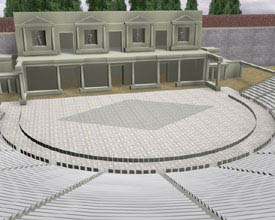
Our K-12 school was immersed for a week in activities revolving around Sophocles' Antigone with loads of exciting projects across the entire curriculum. But Antigone is not for the little ones, so the drama teacher and I cooked up a virtual performance in the style of Ancient Greek theater that would give the elementary students an idea of what it looked and felt like. The drama teacher had five students in grades 10-12 rehearse an adapted Aesop's Fable, The Frogs Desiring A King, and perform it in our standalone sim. Over the summer, I made a replica of the Theatre of Dionysus and some basic clothing. So the show took place at the foot of the Acropolis, upon which The Parthenon was being built by other students! How cool is that! I had to figure out some fun solutions to theatrical problems, like the giant log, which is rezzed from a button at the top of the stage. The stairs that appear briefly are actually rezzed by the log and help the actors get on the log more easily. Voice chat is provided by FreeSWITCH and the recording was made with Fraps in the Imprudence viewer.
As it happened scheduling conflicts resulted in the students having only three 40 minute classes to go from zero to showtime. They had never set foot in a virtual world, much less get an avatar to act, so I think they did a terrific job considering. And one fell ill so the drama teacher had to step in to play Jupiter. Ah, show biz. The little kids loved the show and I think had an experience of Ancient Greek theater that was in some ways closer to the original than the rest of the school.
Friday, November 12, 2010
Avatar Costume Design Noob


I just finished my most developed avatar costume for a character in our 8th grade drama project. I know it's really elementary and clunky but it works well enough for the audience, which will be medium range back. If anyone has suggestions for ways to make attachments that aren't too time consuming, I'm interested. I know better methods have something to do with 'mesh' but haven't had time to investigate.
Saturday, October 23, 2010
Students Build The Parthenon in Opensim
(Can't get the blip.tv embed to work, but here's the link to video.)
 For the last couple weeks I've been working with 8th/9th grade students in their geometry class as they build a life-size replica of The Parthenon atop the Athens Acropolis. It's been a fantastic experience watching students collaborate on such a project. One thing I argued for in planning this project with the math teachers was to give the students part or all of a class to edit their default avatars. They spent the first class making avatars as ugly and as beautiful as they could (this is an all girls school) and I think the investment paid off in their apparent engagement in the project. It's hard learning to use the building tools but they are doing a great job and very proud of it.


Saturday, August 28, 2010
Opensim Grid

Friday, June 18, 2010
Mars Simulation for distribution

This is a standalone 2x2 sim run on Windows XP SP2 that one would connect with using a client viewer like Second Life that is configured to connect over a wired LAN to the IP address of the computer running the sim. All this is detailed below, but there are many other configurations you could have, so I just wanna make that clear. One thing, for the client computers using the viewer app, you MUST use computers with high end video cards. Desktop PCs will tend to have them, as will all (in my experience) newer Macs, from MacBook Pros to iMacs. If you don't have a good video card, the orange sky effect created in step 26 just won't happen, which almost makes it not worth it in my opinion. The space station is set up for 7 astronauts, or a class of 14 students working in pairs to direct the avatars. The lesson I've implemented is documented here. So let's go!
Permissions: "One or more textures on this 3D model have been created with images from CGTextures.com. These images may not be redistributed by default, please visit www.cgtextures.com for more information."
- Choose a host computer for the sim. Preferably a desktop, definitely wired to your LAN. Assign--or have your network administrator assign--a static IP to that computer.
- Download .NET framework 3.5. OpenSimulator requires this on a PC to compile and run. Install it (takes a while, requires a restart). If you're running this on Windows 7 skip this step as .NET 3.5 is included in the OS.
Subscribe to:
Posts
(
Atom
)