UPDATE: How timely that there is a new Make video podcast on how to change a broken iPhone touch screen!
This week I taught a robotics workshop to several Bronx teachers. One of my themes for the workshop was providing their students with an alternate view of technology to the 'black box' model that's becoming more and more prevalent. That is, the idea that technology is given to us consumers ready to use and we shouldn't mess with it if it doesn't do what we want it to, Apple mobile devices being the prime example.
To make this point I showed two videos, the first being an SNL Weekend Update in which Steve Jobs talks about the virtues of the iPhone 3, then closes by admitting the battery only carries 20 minutes of charge (It's a spoof). Then I played a video detailing the steps to change your own iPhone battery. It amazes me that in order to maintain the pristine case you are forced to remove the motherboard to access the battery--the most user-replaceable part there is. It would be so easy to put a little door on the back to pop those failed batteries out, but that would ruin the look and feel of the device.
Not that I dislike Apple products or think people who have iPhones have made a poor choice. They are great for what they do. But I don't want people to think we have to be at the mercy of the company making the technology if it's not working properly or if we want it to do something it wasn't specifically designed to do. (I'm a big fan of MAKE magazine, too, for that reason.)
The best thing about teaching robotics is that it's all about inventing with technology. A robotics kit is simply a tool kit that only begins to do something when you have a purpose in mind and make the robot do it. It's a unique experience for most kids to have such control over technology and hopefully that feeling can extend to technology in general.
Showing posts with label Lego mindstorms. Show all posts
Showing posts with label Lego mindstorms. Show all posts
Sunday, August 01, 2010


Tuesday, November 17, 2009
Wav2Rso: Making it Work Properly

Wav2Rso (scroll down) is a great program for doing one thing--converting WAV audio files to RSO format so they will play on a Lego NXT robot. You can take any WAV file--one you record or one you download from a website like findsounds.com--and put it on your robot. How fun! The only catch is that for some reason Wav2Rso is set to a sample rate of 8000 Hz. The typical WAV file is more like 11,025 Hz, so when you convert it, the sample lowers in pitch considerably and you have a quiet, baritone robot. The fix is to open the WAV file in Audacity or another audio editing program, edit the preferences to set the sample rate to 8000 Hz, then export it to WAV again. This file will convert properly and at the right frequency.
Thursday, May 15, 2008
Learning from robotics

My students are completing a culminating assignment for the Temperature-measuring robot project in which they simply have to write what they learned from the experience. The following is a partial list, but all of it is fascinating and inspiring. I love how some of the learning is specific to programming and engineering and some is about how to confront problems in general, what to do when you are frustrated:
- I learned that making the robot take a temperature overy second is way too often. The water cools very slowly. You end up with about 700 temperature readings if you make it take the temperature every second.
- I learned that it is extremely difficult to make sure you have the correct program in Microworlds.
- We learned that data that appears on Microworlds can also be exported to create a graph on microsoft Excel.
- I learned how to convert celsius to fahrenheit on the computer which can be very useful.
- It was fun but hard.
- I learned that you cannot put loop and the program’s name together or else your system will crash.
- Robotics was really fun, and I learned a lot of things.
- One of the most valuable lessons I learned from making the temperature recording robot is that you must be patient and try again.
- We also learned that there are many ways to tell the RCX to export its data into Excel.
- I learned from making a robot that in order to make a successful robot the base must be sturdy. Without a sturdy base the whole robot breaks off.
- A little enthusiam works to in order to make it a great project!
- I learned how to use the loop command, the “athisway” and “athatway” commands, and I also improved my skills at making graphs on Microsoft Excel.
- I have learned from this project how to program a light senser, how to use a temperature senser, and to create a pully wheel.
- I had never worked with a temperature thermometer before and it was interesting to work with.
- When programming the temerature recording robot you need to have the thermometer firmly stuck on to the robot so when it quickly jerks down into the cup it does not fall off.
- I learned how to program the robot to take the temperature of the hot water, and how to send the temperatures through the RCX to the computer.
- I have learned that when making a program you have to make sure that you have not made any mistakes in the program.
- Making the robot that records temperatures is very hard and people who make it will encounter many problems.
- I learned that you can never do too many things at once because we tried to drive the robot and do it mechnically at the same time. This is hard and it is almost impossible.
- It was really interesting watching how the tempratures would constantly be changing throughout 10 minutes.
- I think that the most interesting thing that we learned, to me, was how to convert the tempratures into the graph on Excel.
- I learned how to use a gear to move a temperature sensor up and down into a cup.
- It takes a lot of patience to program and make the robot record the temperatures. You have to do it many times and there are many things that can go wrong.
- Also, I learned that you must make sure that you do not get someone else’s signal because it really messes up your temperature experiment.
- Overall, I learned many programming, organizing and engineering methods and skills over the course of this experiment.
Wednesday, May 14, 2008
Temperature Measuring RCX
I am just wrapping up a big project with my 7th graders making temperature measuring robots. The students programmed a robotic arm to lower a temperature sensor into a cup of hot water, send the temperature values to Microworlds EX once a second until the water temperature reaches a lower limit they have set (room temperature). Microworlds prints the temperatures in a text box until the RCX stops sending them. Then a button is pressed which exports the values to separate rows in Excel, where the students graph the data. I'm really impressed that my students stuck with this process because many elements of the system were difficult to problem-solve, even though we did it together. Here's one of the robots a pair of students designed, built and programmed. Very clever!
Here is another design. This one has a wicked action on the arm. What you can't really see and hear in the video is that they programmed a series of beeps and blinking lights before the arm swings over.
Here is another design. This one has a wicked action on the arm. What you can't really see and hear in the video is that they programmed a series of beeps and blinking lights before the arm swings over.
Wednesday, November 21, 2007
One switch and the ifelse command
Look here for the reason for these Logo posts.
Setup: Use one switch connected to port 1 and one motor connected to port A. Download this program:
to go
loop [reverse]
end
to reverse
aon
ifelse switch1
[athisway]
[athatway]
end
Setup: Use one switch connected to port 1 and one motor connected to port A. Download this program:
to go
loop [reverse]
end
to reverse
aon
ifelse switch1
[athisway]
[athatway]
end
One switch and the waituntil command
Look here for the reason for these Logo posts.
Setup: Use one switch connected to port 1 and one motor connected to port A. Download this program:
to go
loop [start]
end
to start
waituntil [switch1]
aon
waituntil [not switch1]
aoff
end
The waituntil command functions sequentially, just like other simple commands.
Setup: Use one switch connected to port 1 and one motor connected to port A. Download this program:
to go
loop [start]
end
to start
waituntil [switch1]
aon
waituntil [not switch1]
aoff
end
The waituntil command functions sequentially, just like other simple commands.
Programming an RCX with Logo Commands
I use MicroWorlds EX Robotics to teach 7th graders to program Lego RCX robots. It took me a lot of trial and error to find simple ways to control the input and output for these units; to find efficient programs that direct switches and reflectors to make the RCX do useful things. The accompanying help guide for MW EX provides overly complex examples for just learning the basics, so I figured it might be helpful to post the examples I'm using to get my students started on creating interactive robots.
Wednesday, November 29, 2006
The Harder the Problem, the Sweeter the Solution
Or something like that. A pair of students in my 7th grade robotics class spent the last one-and-a-half classes stuck on a really frustrating problem. While the rest of the class went to town making brilliant windmills exploring the physics of centrifugal force (it that's what it's called, I took Physics for Poets in college), and pushing the limits of early Logo program writing I was knocking my head against the wall helping this team get their RCX to successfully complete the beep test. The tower would send the signal, the RCX display would show that it had received it, but then the program would say the interface is not connected, meaning the tower hadn't received the proper confirmation signal from the RCX. I tried swapping RCX's, towers, computers, user accounts, all to no avail. Finally in the middle of class today I remembered hearing two years ago that fluorescent light can interfere with the infrared signal transmission. So on a hunch I told them to put the RCX and the tower on the floor under the table and it worked! Never has victory tasted so sweet. That problem was really getting under my skin. I told them several times that their frustration was a great sacrifice to the learning of the community because it allowed us to learn about a really tough problem.
Sunday, April 30, 2006
Robo-Expo 2006
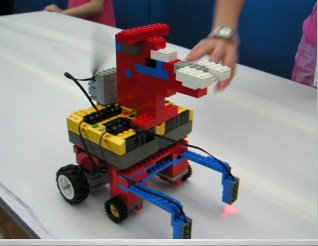
This weekend I took my afterschool robotics class to Robo-Expo 2006, at Nightingale-Bamford School. It was the first time my school has had a team participating in any robotics event, and we had a great time. While I did learn some lessons about putting a team together to create more cohesiveness among the members (make T-shirts!) we did get a good response from Robo Fido (pictured above), which uses reflecting sensors to sense when it is at the edge of the table so it can back up, wag its tail, and go another direction. And our line following robot (pictured below) managed to successfully navigate two of the three line following courses. All in all it was a great first robotics event experience.

Thursday, April 27, 2006
The Right Balance
Yesterday's 7th grade robotics lesson was one of the best I've had. The key was finding a balance between showing them how to do things and giving them choices. I've been frustrated in the past with my short class time (43 min.) and have felt forced into feeding them all the code they need and pre-building robots becasue it seems that they have just enough time to take that and make it work.
What was different yesterday was giving them the pieces they needed with photographs of a simple hoisting mechanism (a switch to press, motor to turn a spool with a string attached to a hook) and the most exciting part, three possible ways to use "waituntil" or "if" or "ifelse" to direct the switch to activate the hoist. While they all used the first option and didn't explore the differences in the commands, what worked really well was that every group came up with a different way to do it, some using two switches, one for up, one for down, and some wrote a procedure to make it go up, then downloaded another procedure to make it go back down. The latter is obviously less effective, but for a unique, student-created solution, it was very exciting to see.
What was different yesterday was giving them the pieces they needed with photographs of a simple hoisting mechanism (a switch to press, motor to turn a spool with a string attached to a hook) and the most exciting part, three possible ways to use "waituntil" or "if" or "ifelse" to direct the switch to activate the hoist. While they all used the first option and didn't explore the differences in the commands, what worked really well was that every group came up with a different way to do it, some using two switches, one for up, one for down, and some wrote a procedure to make it go up, then downloaded another procedure to make it go back down. The latter is obviously less effective, but for a unique, student-created solution, it was very exciting to see.
Friday, March 10, 2006
MicroWorlds EX Robotics and Lego NXT
Don't expect MW EX Robotics to be compatible with Lego NXT any time soon. I just received this from Shawn Jesty at Logo Computer Systems:
I guess that resolves my question of what to be ordering this summer.
"We'll begin development as soon as we get a new NXT brick."
I guess that resolves my question of what to be ordering this summer.
Sunday, January 15, 2006
Tight robotics class

In teaching my second 10-week section of Lego robotics with Logo using MicroWorlds I've started out in a much tighter format than last trimester with this new group of 7th graders. I'm building their basic robots for them (currently a fan, not pictured; that's an old one, student-designed) rather than letting them design and build their own, which is really not the way I think it should be--the class should be about problems in the design and construction of the robot as well as the creating of their programs, and really how these two things affect each other.
Why am I doing it the "wrong" way? My class meets once a week for 45 minutes, well 42 minutes, which includes setup and clean up time. That's a rediculously small amount of time for messy experimentation. Given that my highest priority is that they get to learn as much as possible about programming, which gets messy enough as it is, I need to take some of the building problems out of the equation.
Subscribe to:
Posts
(
Atom
)
