
Sunday, April 30, 2006

Robo-Expo 2006


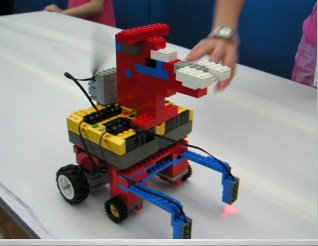
This weekend I took my afterschool robotics class to Robo-Expo 2006, at Nightingale-Bamford School. It was the first time my school has had a team participating in any robotics event, and we had a great time. While I did learn some lessons about putting a team together to create more cohesiveness among the members (make T-shirts!) we did get a good response from Robo Fido (pictured above), which uses reflecting sensors to sense when it is at the edge of the table so it can back up, wag its tail, and go another direction. And our line following robot (pictured below) managed to successfully navigate two of the three line following courses. All in all it was a great first robotics event experience.

Thursday, April 27, 2006

The Right Balance

Yesterday's 7th grade robotics lesson was one of the best I've had. The key was finding a balance between showing them how to do things and giving them choices. I've been frustrated in the past with my short class time (43 min.) and have felt forced into feeding them all the code they need and pre-building robots becasue it seems that they have just enough time to take that and make it work.

What was different yesterday was giving them the pieces they needed with photographs of a simple hoisting mechanism (a switch to press, motor to turn a spool with a string attached to a hook) and the most exciting part, three possible ways to use "waituntil" or "if" or "ifelse" to direct the switch to activate the hoist. While they all used the first option and didn't explore the differences in the commands, what worked really well was that every group came up with a different way to do it, some using two switches, one for up, one for down, and some wrote a procedure to make it go up, then downloaded another procedure to make it go back down. The latter is obviously less effective, but for a unique, student-created solution, it was very exciting to see.

Sunday, April 02, 2006

Project-Based PD for New York Teachers


I just went to the Fordham University Regional Educational Technology Center (RETC)'s free conference for teachers, Tech to Go V. It offers short workshops on a variety of tech integration ideas that are meant to be low-cost and easy for teachers to implement. While I was familiar with everything I saw in the four workshops I attended, I was happy to pick up a few tips here and there (video making without a camera! just still images and narration, just never occurred to me) it was great to see that the focus of the conference is on project-based learning. They seem to have a fairly wide reach among New York public school teachers and the conference was well-attended (~500?) so it was good to see teachers being exposed to great software like Audacity. At the end of the keynote I took the mic (it was offered) and volunteered the resource Odeo, which people seemed very interested in.

Just one downside: one workshop presenter started his workshop with an idea lifted straight out of Tufte's “The Cognitive Style of PowerPoint: Pitching Out Corrupts Within” without giving Tufte credit. I share the same enthusiasm for this book as the presenter and think the example of converting President Lincoln's Gettysburg Address to a slide show is very funny and makes a good point, but it's just so basic to cite your sources, whether you're publishing or presenting. This is just bad modeling for his students, two of which were assisting him by showing their own tech integration projects, as well as for us workshop attendees.
Friday, March 31, 2006

How to begin programming

I just finished converting Reading Pen Pals-a web site I made 4 years ago as a class project (my first!)-into a database web site using PHP/MySQL. It felt like a huge project but went much faster than I thought it would, only a few days. I learned a few things along the way that seem like good lessons for teaching programming to children. I'm not a programmer by training, so I figured my way through the problems I encountered in this project without having much understanding of why the problems existed. So as I reflect on what helped me out, some key points that might help kids come to mind:
  1. Most importantly, look for patterns. I often didn't understand how the syntax worked from the tutorials I used, but seeing similarities in different tutorials allowed me to make good guesses.
  2. Make it work, then make it look nice. Actually, I already tell this to my students, whenever I get a chance. It was really helpful to set up a very small-scale version of what I wanted at each step and make sure it worked, then add features one at a time and only in the end did I make it look the way I wanted. That helped me avoid having to re-do a lot of work unnecessarily.
  3. Patience. This is the hardest thing for kids to maintain. Encountering problems is frustrating and even systematically doing the second point takes lots of patience and restraint. In many cases the problems are interesting and some even teach you something about how computers and the internet work, so if you can enjoy that along the way you're benefitting in more ways than you expect. One problem I havent' yet solved about this project was getting the PHP mail function to stop escaping quotes in the email messages. This gave me a window into the nature of information transmission on the internet and how protocols are set up, though it was just a starting point for learning a lot more.

Sunday, March 26, 2006

Technology for Really Dumb Dummies


I'd been following the story of Barbara Bush's Katrina donation being earmarked for her grand-nephew Neil Bush's junkware company, Ignite! Learning, with the vague interest I have for most of the numerous scandals of the Bush administration. Then a TPM post with a reader's description of clueless and entitled Neil's visit to his lower-east side middle school piqued my interest in what his company's deal is. It turns out their main product is called a COW (Curriculum On Wheels), a bulbous box on a rolling stand in which they've managed to stuff a "computer, projector, and speakers)" and "comes pre-loaded with all of Ignite!'s Science or Social Studies courses."

While they think this nifty little self-enclosed system is a plus ("You just plug it in and start teaching!"), it's really the worst kind of condescension toward teachers that I can imagine. How stupid would it be to purchase a computer and projector that can only be used for one purpose?!? And Neil Bush as much as admits that he doesn't trust teachers to make their own decisions with technology when he says something I can't repeat here about the COW's dummy-proof design (see the link referenced above). There are just so many things wrong with this product I can't bear to list them all...

Wednesday, March 15, 2006

Power Point Stifles Thought and Communication

I've been reading Edward Tufte's “The Cognitive Style of PowerPoint: Pitching Out Corrupts Within”. Arvind's comments on 21 Apples cover most of my thoughts, but after this reading and talking I sat down to try out some of the alternate diagrammatical schemes Power Point offers besides bullets and clipart. It's worse than I could have imagined. All of the non-linear organizational charts are so bound by their extreme adherence to form as to make them completely useless for effective communication. They are airtight containers that constrict all content to their own limitations. Let's take a look at PowerPoint's chart madness, or at least a couple samples for now as I'm getting tired.

1. The Target is the most rediculous: This is to be "used to show steps toward a goal." The first thing you notice is that the steps are in the wrong order--bottom to top. There's no way to change this since the text and links are immovable. They beg to be dragged around the shape until they're positioned just right, but they won't budge. You can apply some pretty eye-catching styles to your bullseye, though.

2. The Cycle is meant to "show a process with a continuous cycle." That's fine if the cycle you want to illustrate really has no beginning or end. I tried to flip one of the arrows to show how an event might enter the system, but these arrows are stuck like a tram on a cable. The best I could do was copy and paste one and grab at those weird MS Office graphics manipulation handles until one of them flipped it over. Even then, the most the intruding arrow can do is lie on top of one that's cemented into place. The handles are flights of fancy you can use to distort the arrows into whimsical but useless shapes, like this nice donut I made.

Friday, March 10, 2006

MicroWorlds EX Robotics and Lego NXT

Don't expect MW EX Robotics to be compatible with Lego NXT any time soon. I just received this from Shawn Jesty at Logo Computer Systems:
"We'll begin development as soon as we get a new NXT brick."

I guess that resolves my question of what to be ordering this summer.

Sunday, January 15, 2006

Lego NXT

The new generation of Lego robotics is due out in a few to several months, from Mindstorms 2.0. to Mindstorms NXT. Read about it at Nextbrick and this great article in Wired.

Tight robotics class


In teaching my second 10-week section of Lego robotics with Logo using MicroWorlds I've started out in a much tighter format than last trimester with this new group of 7th graders. I'm building their basic robots for them (currently a fan, not pictured; that's an old one, student-designed) rather than letting them design and build their own, which is really not the way I think it should be--the class should be about problems in the design and construction of the robot as well as the creating of their programs, and really how these two things affect each other.

Why am I doing it the "wrong" way? My class meets once a week for 45 minutes, well 42 minutes, which includes setup and clean up time. That's a rediculously small amount of time for messy experimentation. Given that my highest priority is that they get to learn as much as possible about programming, which gets messy enough as it is, I need to take some of the building problems out of the equation.

Monday, January 02, 2006

MySpace is not YourSpace

The tussle between MySpace users and Murdoch is very interesting and I'm on the edge of my seat watching it develop. Once Murdoch Inc. bought MySpace, it began meddling in typical cutthroat corporate fashion by blocking all references to competitor YouTube. This was a big miscalculation because of the sudden popularity of the Chronic (what?) cles of Narnia video that users wanted to bring into their MySpace pages. I think there's a lot at stake here, the insidious infiltration of corporate interests into peoples' expanding expectations to have resources available to express their social/creative interests--an impending collision.

Relevance to education? This is Media Literacy 101 as far as I'm concerned and my students need it badly. I'm glad users are seeing the influence of the site's owners, lest they continue to think that owners of social software have only the users' interests in mind.
